

Dr. Michael Heidinger
CEO, Digital Power Systems
CEO, Digital Power Systems
Introduction
This tutorial provides a step-by-step guide to mass-programming the DCP48M DC/DC converter using a Modbus connection via a Windows PC with a USB-to-RS485 adapter.
Required Material
- DCP48M DC/DC converter
- Windows PC
- USB-to-RS485 adapter (recommended: Waveshare FTDI USB-to-RS485)
Hardware Wiring
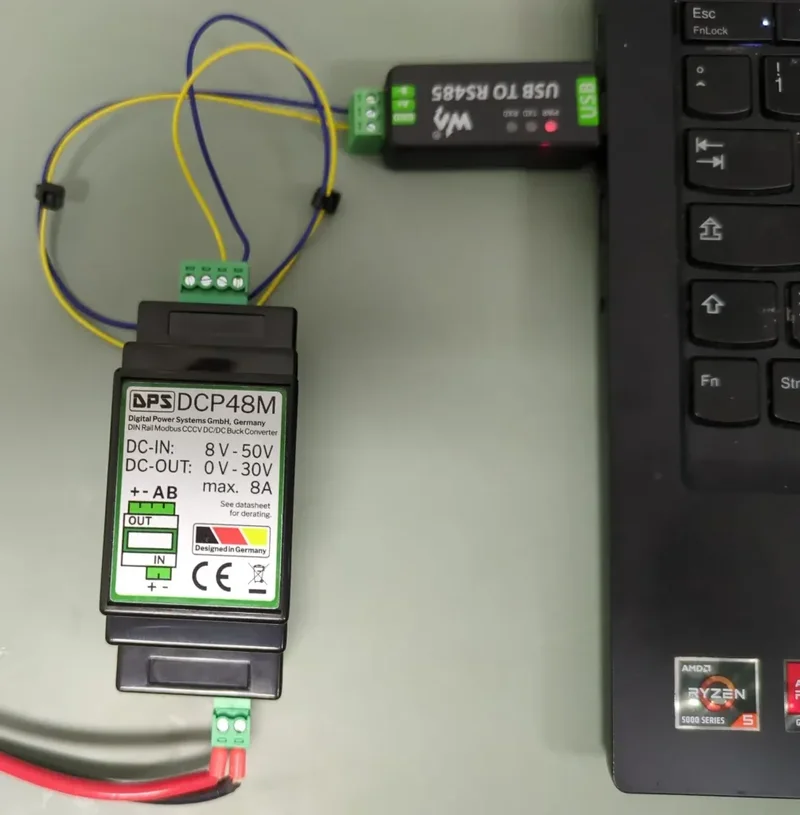
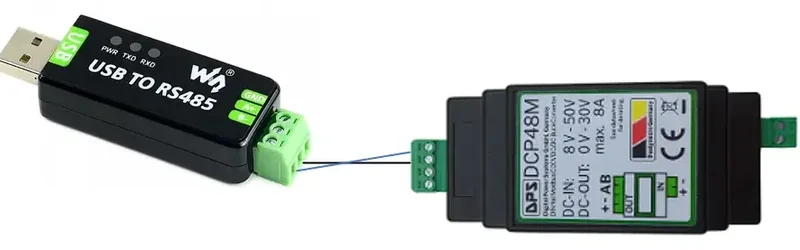
Connect the RS-485 adapter terminals: A to A, B to B. RS-485 does not strictly require a ground connection, but if needed, use the "-" terminal from the power input.
Installing Python on Windows
- Download the programming script (ZIP file)
- Unzip the file, right-click to open a terminal in the folder
- Install required libraries:
python -m pip install pymodbus pyserial - Verify the installation:
python -c "import pymodbus; print(pymodbus.__version__)" - Modify the COM port in the configuration section of the script
- Execute the script:
python modbus_massprogramming.py
Setting Up Parameters
In the script, uncomment the parameters you want to modify. Set ENABLE_SAVE_PARAMETERS = True to persist changes. The script also supports hardware control pin modification (PCB version 5 and later).
⚠ Note: Modifying control parameters may void the warranty. Proceed with caution and consult DPS support if unsure.